raspberry(linux), clojure (websockt), emacs (cider), (pythoy ble, serial, opencv), etc.
系统架构
- 树莓派端: 作为设备管理器, 开机时候通过websocket和服务器建立连接, 汇报状态
- 服务器端: 一方面为client提供rest接口, 另一方面通过websocket和树莓派通讯, 监控状态, 下发命令, 调用硬件
                                +--------------------+
                                |       client       |
                                +---------+----------+
                                          |
                                          |
                                          |restful
                                          |
                                          |
                               +----------+----------+
                               |                     |
                               | web/socket-server   |
                               |                     |
                               +----------+----------+
                                          |               websocket
       +----------------+-----------------+---------------+-------------------+
       |                |                 |               |                   |
       |                |                 |               |                   |
  +----+-----+     +----+----+        +---+----+     +----+-----+       +-----+----+
  |   pi     |     |   pi    |        |    pi  |     |    pi    |       |   ....   |
  +----------+     +---------+        +----+---+     +----------+       +----------+
                                          | ble
                               usb        |      com
                      +-----------------+ | +----------------+
                      |  usb cameras    +-+-+  height detect |
                      +-----------------+ | +----------------+
                                          |
                                    +-----+------------+
                                    |    mi   scale    |
                                    +------------------+
树莓派
硬件:
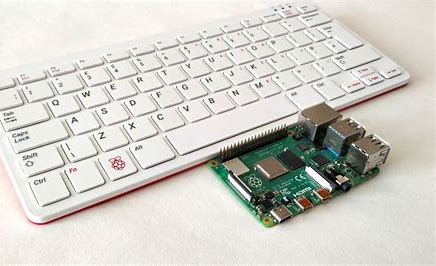
- 开发用的 是raspberry 400(4G内存, 就是那个键盘)
- 部署是用的rasbberry 4b(2G内存, 那块绿色的小板子)
/sshx:pi-work:/home/pi $ lsb_release -a
No LSB modules are available.
Distributor ID:	Raspbian
Description:	Raspbian GNU/Linux 10 (buster)
Release:	10
系统开发依赖的软件和库
| package | version        |
|---------|----------------|
| openjdk | openjdk 11.0.9 |
| clojure | clojure1.10    |
| python  | Python 3.7.3   |
|         |                |
开机自启动
树莓派的应用使用clojure写的,我们要把启动命令写成一个脚本
#!/bin/sh
cd /home/pi/sandbox/rc/new-device/app
lein run
这个脚本放到开机的入口
#!/bin/sh -e
#
# rc.local
#
# This script is executed at the end of each multiuser runlevel.
# Make sure that the script will "exit 0" on success or any other
# value on error.
#
# In order to enable or disable this script just change the execution
# bits.
#
# By default this script does nothing.

# Print the IP address
_IP=$(hostname -I) || true
if [ "$_IP" ]; then
  printf "My IP address is %s\n" "$_IP"
fi

su pi -c "exec /home/pi/run-client.sh"  # <--- this line make the magic happen.

exit 0;
自动更新
设置系统的cron定时任务, 最小的定时粒度是分钟, 星号是通配符
+-------------------------------------------------------------+
|                                                             |
| *     *     *   *    *        command to be executed        |
| -     -     -   -    -                                      |
| |     |     |   |    |                                      |
| |     |     |   |    +----- day of week (0-6) (Sunday=0)    |
| |     |     |   +------- month (1-12)                       |
| |     |     +--------- day of month (1-31)                  |
| |     +----------- hour (0-23)                              |
| +------------- minute (0-59)                                |
|                                                             |
|                                                             |
+-------------------------------------------------------------+
通过自动拉取git代码, 自动更新.
每分钟git pull一次, 设置好要忽略的文件,保证pull可以成功, 结合重启后的自动运行, 完成了系统升级
远端修改配置&执行脚本
通过特定接口触发配置文件修改
emacs的trampmode
极大方便了开发和调试, 使用emacs tramp功能同时远端调试server和设备
  remote server                                        remote raspberry

 +--------------+              websocket              +-------------+
 |    service   +-------------------------------------+socket client|
 +--------------+                                     +-------------+
 |    nrepl     |                                     |    nrepl    |
 +--------------+                                     +-------------+
 |    sshd      |                                     |     sshd    |
 +------+-------+                                     +------+------+
        |                                                    |
        |ssh                local dev emacs                  | ssh
 +------+----------------------------------------------------+------+
 |                            ssh                                   |
 +------------------------------------------------------------------+
 |                           emacs tramp                            |
 +------------------------------------------------------------------+
 |                  cider projectile etc.                           |
 +------------------------------------------------------------------+
websocket
双向连接始终是一个复杂的话题, socket是一个比较容易接受的方案, 但是socket的使用可以非常复杂.
- socket怎么建立
- 消息队列缓冲
- socket保活
- 断连后恢复
sente 帮我们解决了大部分的socket繁琐底层事务.
摄像头拍照
使用opencv写的python脚本, 抓特定摄像头的输入为图片
import cv2

cam = cv2.VideoCapture(0)
ret, frame = cam.read()
if not ret:
    print("failed to grab frame")
else:
    img_name = "opencv_frame.png"
    cv2.imwrite(img_name, frame)
    print("{} written!".format(img_name))
cam.release()
串口通讯
我们系统中使用超声传感器做为身高测量. 这个传感器使用UART串口, 我们使用USB转连
   +-----------------+                       +-----------------+
   |                 +----------+------------+                 |
   |  raspberry pi   |  usb port|  uart port |     sensor      |
   |                 +----------+------------+                 |
   +-----------------+                       +-----------------+
usb port和uart port之间通过一个 USB to TTL的设备做转接, 其中的连线方式如下, 注意tx-rx, rx-tx, 即接受端和发送端连接, 发送端和接受端连接.
        usb to TTL                        height detec
        +-----------+                    +-----------+
        |           |                    |           |
        |           |                    |           |
        |       +5V +--------------------+ VCC       |
        |           |                    |           |
        |        RX +--------------------+ TX        |
        |           |                    |           |
        |        TX +--------------------+ RX        |
        |           |                    |           |
        |       GND +--------------------+ GND       |                          .
        |           |                    |           |
        |       3V3 +---              ---+ OUT       |
        |           |                    |           |
        |           |                    |           |
        |           |                    |           |
        +-----------+                    +-----------+
使用python的串口读取库来做串口的读写通讯
下发指令:0x55 0xaa 0x01 0x01 0x01 checksum 读取数据:0x55 0xAA 0x01 0x01 0x02 0x33 checksum
第5,6位是读到的数据
查看系统现有的串口 python -m serial.tools.list_ports
packet = bytearray()
packet.append(0x55)
packet.append(0xaa)
packet.append(0x01)
packet.append(0x01)
packet.append(0x01)

srial.Serial('/tty/USB0', 9600, timeout=1)
ser.write(packet)
ser_bytes = ser.readall()
distance = struct.unpack('>H', ser_bytes[4:6])
clojure调用脚本
clojure需要调用python脚本实现串口读取, usb摄像头拍照都需要调用shell脚本, sh函数返回被调用脚本执行结果的一个map, 返回状态码, 标准输出stdout, stderr的字符串.
(clojure.java.shell/sh "pwd")
=> {:exit 0,
    :out "/Users/kevin/sandbox/rc/new-device/back-end\n",
    :err ""}
static scope 和 dynamic scope
静态作用域, 又称为词法作用域 (lexical scope), 这种作用域是我们接触的绝大多数语言的作用域 (Java, C/C++, Python甚至JavaScript).
每个block都有自己的作用域, 子blog的作用域中的变量可以override父级作用域的同名变量, 作用域的规则在编译期间完全决定.
(let [x 1]
  (let [x 2]
    (prn "inside scope:" x))
  (prn "outside scope:" x))
动态作用域是clojure的一个特性, 是一个动态特性 (执行期间)
要理解symbol, var, value
                    +--------------+------------+------------+
                    |              |            |            |
 (def a 1) -------> |  symbol: a   | -----------|  value: 1  |
                    |              |     var    |            |
                    +--------------+------------+------------+

                           #'a  is the same as (var a)
实现方式:
- 在声明一个var (def/defn)的时候, 声明为dynamic
(defn ^:dynamic *a* 1). - 线程在执行某段代码时候, 可以使用
(binding [*a* 2] ...)在thread-local中存储变量. - 退出这个block的时候恢复原来的绑定值.
应用场景:
动态控制程序的执行行为, 比如dbeug, 单元测试, 打log等, 比如下面的单元测试固定了执行的硬件版本.
(t/deftest test-vs-cmd
  (t/testing "vs-cmd-890"
    (binding [state/*hardware-version* (fn [] "890")]
      (t/is (=
             "01458100000000000000"
             (sut/vs->cmd [:v1 :v3 :v7 :v9 :v16] :open))))))
线程的pause和resume
在java中, 实现线程的暂停和继续需要用到wait和notify. Clojure的实现则更简单
(ns httpkit-back-end.util
  (:require [clojure.core.async :refer [>!! chan timeout alts!!]]))

(def *msg-record (atom {}))

(defn msg-send [{:keys [device-id msg-type msg-id] :as msg} send-fn]
  (let [c (chan)]
    (swap! *msg-record assoc-in [device-id msg-type msg-id ]  c)
    (send-fn)
    (let [[msg-body _] (alts!! [(timeout 5000) c])]
      (swap! *msg-record  dissoc device-id)
      msg-body)))

(defn msg-recv [{:keys [device-id msg-type msg-id msg-body]}]
  (let [c (get-in @*msg-record [device-id msg-type msg-id])]
    (when c
      (>!! c msg-body ))))
下面是我们的三个单元测试场景, 分别模拟了正常和超时的情况, 注意到msg-reve都是在一个单独的线程完成的.
(ns httpkit-back-end.util-test
  (:require [httpkit-back-end.util :as sut]
            [clojure.core.async :refer [thread]]
            [clojure.test :as t]))

(t/deftest 收发消息
  (t/testing "收发完整流程"
    (t/is
     (= "100"
        (do
          (thread
            (Thread/sleep 10)
            (sut/msg-recv {:device-id 1 :msg-type :a/b :msg-id 123 :msg-body "100"}))
          (sut/msg-send {:device-id 1 :msg-type :a/b :msg-id 123} prn)))))
  (t/testing "超时时间之内 < 5s"
    (t/is
     (= "100"
        (do
          (thread
            (Thread/sleep 1000)
            (sut/msg-recv {:device-id "1" :msg-type :a/b :msg-id 124 :msg-body "100"}))
          (sut/msg-send {:device-id "1" :msg-type :a/b :msg-id 124} prn)))))
  (t/testing "超时 > 5s"
    (t/is
     (nil?
      (do
        (thread
          (Thread/sleep 6000)
          (sut/msg-recv {:device-id "1" :msg-type :a/b :msg-id 125 :msg-body "100"}))
        (sut/msg-send {:device-id "1" :msg-type :a/b :msg-id 125} prn))))))