September 29, 2022
By: 马海强
re-frame & kee-frame使用
Table of Contents
用公司模板创建一个项目
新建项目
lein new hc-template cljs-management
运行项目
后端
- 命令行启动
lein repl
- 使用emacs+cider启动clj,
M-x cider-jack-in-clj
前端
- 命令行启动
      npm install

      shadow-cljs server
- 使用emacs+cider启动cljs,
M-x cider-jack-in-cljs,选择shadow
clojurescript项目构成
依赖管理
- shadow-cljs.edn 管理clojars依赖
- package.json 管理npm的依赖包
前端build配置
- shadow-cljs.edn
  :source-paths ["src/cljc" "src/cljs" "env/dev/cljs"]
  :builds
   {:app
  {:target :browser
   :output-dir "target/cljsbuild/public/dev/js"
   :asset-path "/js"
   :modules {:app {:entries [cljs-management.app]}}
   :devtools {:watch-dir "resources/public"
              :loader-mode :eval
              :preloads [re-frisk.preload]
              :console-support true}
   :closure-defines {"re_frame.trace.trace_enabled_QMARK_" true}
   :dev
   {:closure-defines {cljs-management.config/domain "http://localhost:3000"
                      cljs-management.common.utils/print-log? true}}}}
前端环境变量
shadow-cljs.edn指定打包时环境
通过修改goog-define定义参数名赋值
(goog-define domain "http://localhost:3000")
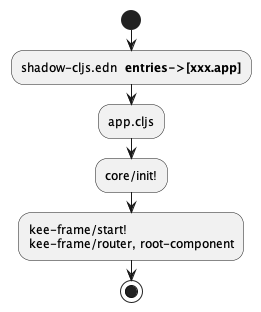
Cljs启动流程
- shadow-cljs.edn配置文件指定环境里app的entries的namespace为: xxx.app
(core/init! true)
- core.cljs里的init!入口函数
kf/start!
调用顺序图
知识(踩坑)点
新建一个页面的要素
Route demo
    (def routes
     (reagent.core/atom
       [["" {:name  :home
             :title "首页"
             :icon  "home"
             :page  index-page}]
        ["/index" {:name :index :title "首页管理" :icon "home"}]
        ["/system" {:name :system :title "系统管理" :icon "setting"}
         ["/user" {:name  :system-user
                   :title "系统用户"
                   :page  sys-user-page}]
         ["/menu" {:name  :system-menu
                   :title "系统菜单"
                   :page  sys-menu-page}]]]))
扩展
    (require '[reagent.core :as r])

    (def num (r/atom 1))

    (swap! num inc) ; => (inc num) => num = 2
    (reset! num 5)  ; => num = 5
路由使用
- 路由用法: 路径逐级拼接,数据做递归合并
- reitit.core/route & ring-handler & kee-frame.core/switch-route
- kee-frame.core/switch-route: 简洁
- reitit.core/route: 创建一个路由
- ring-handler: ring server的服务端路由
Html入口 :: 讲解blog的"REAGENT 深入学习"三部分
- form1:返回hiccup vector的函数 reagent深入学习第一部分
- form2:返回函数的函数 reagent深入学习第二部分
- form3:返回Class的函数 reagent深入学习第三部分
db和他的服务员
初始化db
(kf/start! {:initial-db nil})
re-frame & kee-frame
re-frame
lein new re-frame abcd +10x渊源 :: re-frame with batteries included.
- re-frame 是状态管理的基础,为前端提供了中心化数据存储和状态管理.
- kee-frame 在re-frame的基础上做了一些扩展,把状态控制交给路由来做, 增加了controller(后面讲解)
使用
在项目中是混合使用的.规则以现有代码为例.
re-frame的reg-event-db \ reg-event-fx \ reg-event-ctx
reg-event-db 是reg-event-fx 的更专注、更有限的版本.当要处理程序只关心db值时, 入参和出参都是db
reg-event-fx 注册事件处理程序的最常见情况 入参:coeffects 出参:effects
reg-event-ctx 更低级别,接收整个context,极少使用
{:coeffects {:event [:some-id :some-param]
            :db    <original contents of app-db>}

:effects   {:db    <new value for app-db>
            :dispatch  [:an-event-id :param1]}

:queue     <a collection of further interceptors>
:stack     <a collection of interceptors already walked>}
kee-frame.core/controller
controller在发生路由跳转的时候触发.
controller是个map,里面的两个key,:params和:start分别挂了一个函数.
- params:参数是路由
- 格式: [:路由名称 {路由参数map}]
- start:以context和第一个函数的返回值为输入或是nil.
- 格式: [ctx params的返回值]
- params:参数是路由
Example
(kf/reg-controller
       ::product-form-controller
       {:params (fn [route]
                  (let [path (get-in route [:path-params :path])
                        query (get route :query-string)]
                    (when (and (= path "/index/qianggou-time/product-detail")
                               (re-find #"id=\w+" (or query "")))
                      (second (string/split query "=")))))
        :start (fn [_ id]
                 (rf/dispatch [::fetch-time-product-detail id]))})
start对应的函数是否执行由以下规则决定:
路由参数和返回值都和上次一样,start函数不执行
上次是nil,这次不是,start函数执行
上次不是nil这次是nil,执行:stop函数, :stop函数是可选的,不一定有
上次和本次都不是nil,且两次结果不一样, 先stop,再start
延伸 根据以上规则,常见场景
启动时候仅仅执行一次的操作
{:params (constantly true) ;; true, or whatever non-nil value you prefer
 :start  [:call-me-once-then-never-again]}
每次发生路由的时候都做一次的操作,比如logging
{:params identity
 :start  [:log-user-activity]}
最常见:到特定路由的时候发生的操作,比如请求某个接口
跳转页面
path-for
(kee-frame.core/path-for [:todos {:id 14}]) => "/todos/14"navigate-to
(reg-event-fx
 :todo-added
 (fn [_ [todo]]
   {:db          (update db :todos conj todo)
    :navigate-to [:todo :id (:id todo)]]}) ;; "/todos/14"
ajax组件 :: http-xhrio
(require '[day8.re-frame.http-fx])
(require '[ajax.core :as ajax])
json请求
(re-frame/reg-event-fx
 ::http-post
 (fn [{:keys [db]} _]
   {:db (assoc db :show-loading true)
    :http-xhrio {:method          :post
                 :uri             "https://httpbin.org/post"
                 :params          data
                 :timeout         5000
                 :format          (ajax/json-request-format)
                 :response-format (ajax/json-response-format {:keywords? true})
                 :on-success      [::success-post-result]
                 :on-failure      [::failure-post-result]}}))
form请求
(re-frame/reg-event-fx
  ::http-form
  (fn [_world [_ val]]
    {:http-xhrio {:method :post
                     :uri "https://localhost:3000"
                     :body form-data
                     :headers {:authorization (get-token)}
                     :timeout 30000
                     :response-format (http/json-response-format {:keywords? true})
                     :on-failure [::error request-event nil]}}))
对标后台 :: clj-client
(require '[clj-http.client :as http])
(http/get "http://cdn.imgs.3vyd.com/xh/admin/test.json" {:as :json})

(http/get "http://cdn.imgs.3vyd.com/xh/admin/test.json" {:as :json})

(http/post "http://localhost:8185/management/public/userList"
                                     {:form-params
                                      {:mobile   "15092107090"
                                       :nickName "marvin.ma"
                                       :name     "marvin"
                                       :openid   "8"}
                                      :content-type :json})

(http/post "http://localhost:8185/management/oauth2/token"
                                     {:form-params
                                      {:username   "test"
                                       :password   "test123"
                                       :client_id  "management-Client"
                                       :grant_type "password"}})
css使用
待补充
进阶使用
kee-frame.core/reg-chain
example
(kee-frame.core/reg-chain
 :league/load
             (fn [ctx [id]]
               {:http-xhrio {:method          :get
                             :uri             (str "/leagues/" id)}})

             (fn [{:keys [db]} [_ league-data]]
               {:db (assoc db :league league-data)
                :http-xhrio {:method          :get
                             :uri             (str "/leagues/" id)}})

             (fn [{:keys [db]} [_ league-data data2]]
               {:db (assoc db :league league-data)}))
第一个参数是dispatch时的参数,往后每个函数的第二组参数依次是每一次请求的结果。
应用 使用reg-chain解决token失效自动刷新问题,请求前先判断token是否过期,如果过期获取 个新token
reagent使用react hook
React和Reagent交互
clojurescript和javascript交互
clojurescript和javascript交互 2020-08-10更新
shadow-cljs高级用法
待补充